

ついにローカルにもMiniMax H3というOmni-Reference(オムニリファレンス)に対応した動画生成AIが登場しました。
しかし、高性能がゆえに生成時間も長くなってしまいます。
ですが、そんな生成時間を少しでも短くできる高速化ノードが存在します。
なので今回は、26/8/8時点での主要な高速化ノードを使い生成時間がどれだけ変わるのか。生成される動画の品質にはどれほど影響があるのかを、FL2VAとRef2VAの両方で試してみることにしました。
実行環境
今回の検証で使用した実行環境です。
OS : Windows 11
GPU : NVIDIA GeForce RTX 5090 32GB
CPU : Intel Core Ultra 7 265K
メモリ : 128GB
ComfyUIバージョン : 0.30.1
Pythonバージョン : 3.13.6
PyTorchバージョン : 2.9.1+cu130
使用したモデル
使用したモデルです。
・FL2VA
・diffusion_models
minimax_h3_fl2va_int8_convrot.safetensors
・text_encoders
qwen3vl_32b_minimax_h3_nvfp4_awq.safetensors
・vae
minimax_h3_video_vae_fp16.safetensors
・vae
minimax_h3_audio_vae_fp32.safetensors
・Ref2VA
・diffusion_models
minimax_h3_ref2va_int8_convrot.safetensors
・text_encoders
qwen3vl_32b_minimax_h3_nvfp4_awq.safetensors
・vae
minimax_h3_video_vae_fp16.safetensors
・vae
minimax_h3_audio_vae_fp32.safetensors
使用する高速化ノード
使用する高速化ノードは以下の3つです。
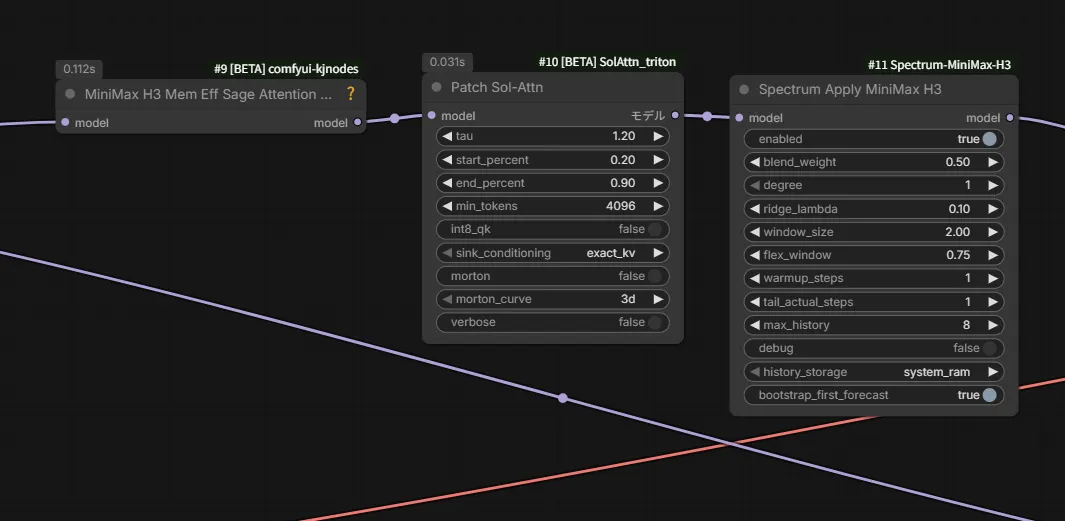
これらはComfyUI標準のノードではなく、カスタムノードです。
それぞれ以下のカスタムノードで導入することが出来ます。
・MiniMax H3 Mem Eff Sage Attention Patch
ComfyUI-KJNodes
・Patch Sol-Attn
ComfyUI-SolAttn_triton
・Spectrum Apply MiniMax H3
ComfyUI-Spectrum-MiniMax-H3
生成条件
生成条件は以下の通りです。
FL2VAでは576×736 (10秒) 、Ref2VAでは864×480 (10秒)の動画をシード値固定で8つの条件で生成します。
条件は以下です。
| Mem Eff Sage | Sol-Attn | Spectrum |
| なし | なし | なし |
| あり | なし | なし |
| なし | あり | なし |
| なし | なし | あり |
| あり | あり | なし |
| あり | なし | あり |
| なし | あり | あり |
| あり | あり | あり |
パラメーターのある高速化ノードは、全てデフォルトで行います。
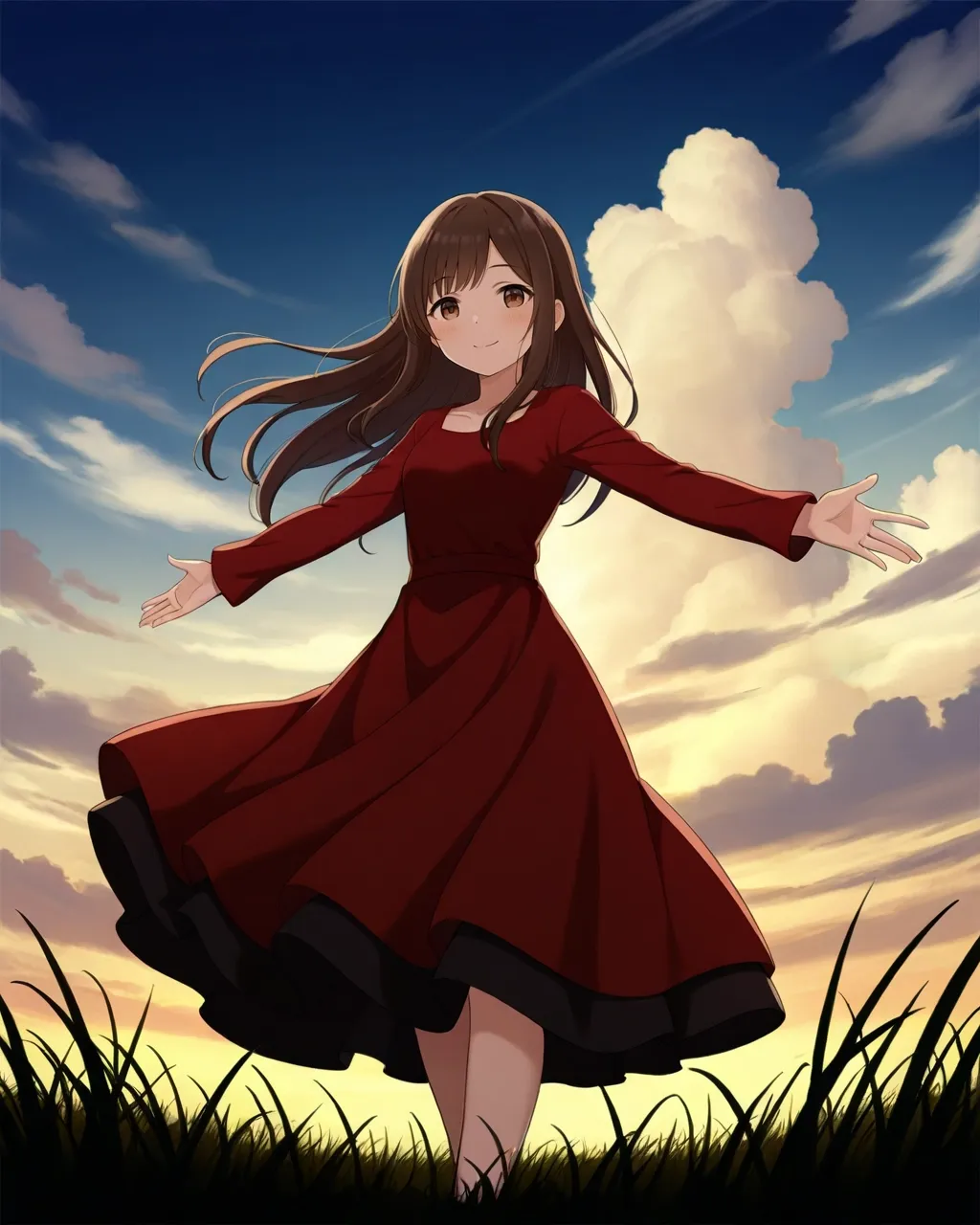
FL2VAの開始フレームで指定した画像とプロンプトは以下。

The scene shifts to the city streets.
The town's art style is anime-style.
A video of the character from <Picture 1> dancing in the city.
The only audio is the background music.

[Shot 1] The character from <Picture 1> is standing still with both arms held at their sides. The scene is filmed from behind, with the camera gradually moving closer.

[Shot 1] At 00:03.000, the camera cuts to a frontal view of the character from <Picture 1>.
The character in <Picture 1> performs an acrobatic dance.

[Shot 2] At 00:05.000, switch the camera to an upward angle.

[Shot 3] 00:06.500, Cut the camera to the side of the character in <Picture 1>.

[Shot 4] At 00:08.500, switch the camera to the side view.
The character in <Picture 1> forcefully extends their right arm upward, holds that pose, and finishes the dance.
Ref2VAで指定した画像とプロンプトは以下。
A fight scene.
The location is a multi-story parking garage.

The person in <Picture 1> and the person in <Picture 2> are facing each other, poised for combat.

[Shot 1] At 00:01.000, the two are engaged in a stylish hand-to-hand fight.

[Shot 2] At 00:05.000, the two unleash their finishing moves, triggering intense visual effects.

[Shot 3] At 00:08.000, the two shake hands, acknowledging each other's valiant effort.
スポンサーリンク
生成結果
それでは結果を書いていきます。
音声はミュートにしてあります。音声を聞きたい場合はミュートを解除してください。
その際は音量に注意してください。
FL2VAの結果
高速化ノード : なし
生成時間 : 約3分37秒
高速化ノード : Mem Eff Sage
生成時間 : 約2分50秒
高速化ノード : Sol-Attn
生成時間 : 約2分44秒
高速化ノード : Spectrum
生成時間 : 約2分19秒
高速化ノード : Mem Eff Sage + Sol-Attn
生成時間 : 約2分10秒
高速化ノード : Mem Eff Sage + Spectrum
生成時間 : 約1分30秒
高速化ノード : Sol-Attn + Spectrum
生成時間 : 約1分48秒
高速化ノード : Mem Eff Sage+ Sol-Attn + Spectrum
生成時間 : 約1分30秒
スポンサーリンク
Ref2VAの結果
高速化ノード : なし
生成時間 : 約3分44秒
高速化ノード : Mem Eff Sage
生成時間 : 約2分13秒
高速化ノード : Sol-Attn
生成時間 : 約2分41秒
高速化ノード : Spectrum
生成時間 : 約2分22秒
高速化ノード : Mem Eff Sage + Sol-Attn
生成時間 : 約2分15秒
高速化ノード : Mem Eff Sage + Spectrum
生成時間 : 約1分30秒
高速化ノード : Sol-Attn + Spectrum
生成時間 : 約1分49秒
高速化ノード : Mem Eff Sage+ Sol-Attn + Spectrum
生成時間 : 約1分32秒
最後に
生成速度は向上していますが、プロンプトの効きにも影響が出ていますね。
FL2VAでは途中のカットでキャラクターを側面から映すというプロンプトを入力しているのですが、Spectrum Apply MiniMax H3を適用した場合、側面から映すというプロンプトは反映されていません。
高速化ノードはそのあたりも吟味して使用する必要がありそうです。
それでは!
スポンサーリンク

コメント